June 26, 2026 · 7 min read
Azure Private Link Service: Private Connectivity Without Public Exposure
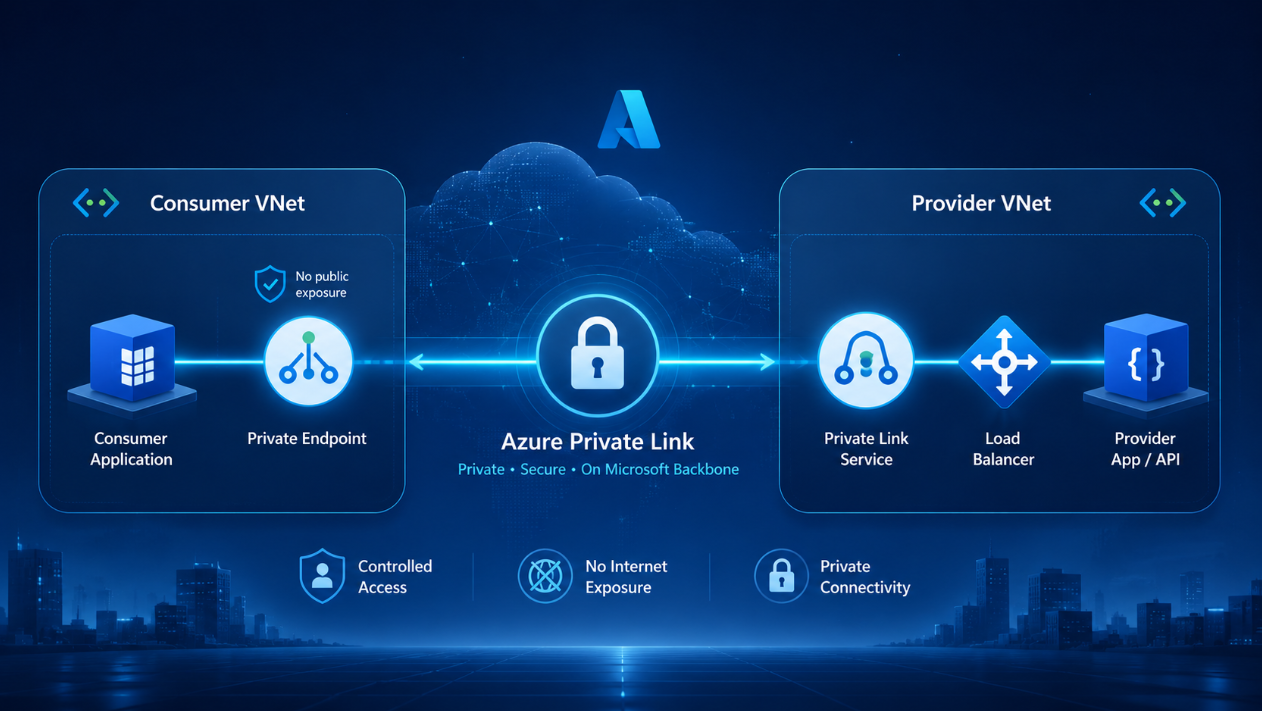
One of the biggest questions in cloud networking is simple:
How do I allow another application, customer, partner, or internal team to access my service privately without exposing it to the public internet?
This question comes up a lot in real Azure environments.
It could be an internal API. It could be a SaaS platform. It could be a shared service used by different teams. It could even be an AI application that needs to work with sensitive company data.
In all of these cases, the goal is usually the same:
We want the service to be reachable, but we do not want to expose it publicly or open up more network access than necessary.
That is where Azure Private Link Service becomes very useful.
Before we go into the architecture, let’s clear up the terminology, because this is where many people get confused.
Let’s clarify a few things first
There are three names you will hear a lot:
- Azure Private Link
- Private Endpoint
- Private Link Service
They sound similar, but they are not the same thing.
Azure Private Link is the underlying Azure technology that makes private access possible.
Private Endpoint is created on the consumer side. It creates a private IP address inside the consumer’s virtual network and uses that IP to represent a specific service inside that network.
That last part is important.
The service itself is not physically moved into the consumer’s VNet. For example, Azure Storage, Azure SQL, or a provider-owned API is still running where it was originally hosted. But the Private Endpoint makes that service appear inside the consumer’s network through a private IP address.
So from the consumer’s point of view, they are not connecting to a public endpoint somewhere on the internet. They are connecting to a private IP in their own subnet.
I like to think of it like this:
A Private Endpoint is a private doorway to an external service, placed inside the consumer’s own network. This makes the service look like it's inside the customer's own network.
Behind the scenes, Azure creates a read-only network interface in the subnet you choose (Read-only because you cannot modify the IP allocation). That network interface gets a private IP address, and that private IP becomes the private entry point to the target service.
That is why DNS matters so much. Your application may still call the normal service name, but DNS should resolve that name to the Private Endpoint IP.
Private Link Service on the other hand, is used by a provider to publish their application or service privately. This is typical in highly regulated environments. It is used when you own the service and want to make it available privately to another network.
For example, if you have built your own API, application, platform, or backend service, Azure does not automatically know how to expose it privately to other networks. You create a Private Link Service so consumers can connect to your service using their own Private Endpoints.
So the relationship is:
- Private Link Service publishes the provider’s service privately.
- Private Endpoint allows the consumer to connect to that published service privately.
If you are connecting privately to services like Azure Storage, Azure SQL, Key Vault, Azure AI Search, or Azure OpenAI, you are usually creating a Private Endpoint.
But if you have built your own API, application, platform, or service, and you want another network to access it privately, you use Private Link Service.
Provider side and consumer side
As you may have noticed earlier, in a Private Link setup, there are usually two sides.
Provider side means the side that owns and publishes the application or service.
Consumer side means the side that connects to and uses the service privately.
For example, if Microsoft exposes Azure Storage privately and your application connects to it, Microsoft is the provider and you are the consumer.
But if your company exposes an internal API privately to another team, customer, or partner, then your company becomes the provider.
This is why Private Link Service is so useful for SaaS platforms, partner integrations, and multi-tenant applications.
But... Why not just use VNet peering?
This is a fair question.
VNet peering connects networks.
Private Link connects to a service.
That difference matters.
With VNet peering, you create wider connectivity between two virtual networks. That may be fine in some cases, but sometimes it is more access than you want to give.
With Private Link, the consumer only gets access to the specific service you expose.
That is the main idea: Expose the service, not the network.
This also helps with the commonest VNet peering issue; overlapping IP ranges. Instead of trying to connect two full networks together, you give the consumer a private endpoint to one service.
Cleaner. Safer. Easier to reason about.
What the architecture looks like
A common Azure Private Link Service architecture looks like this:
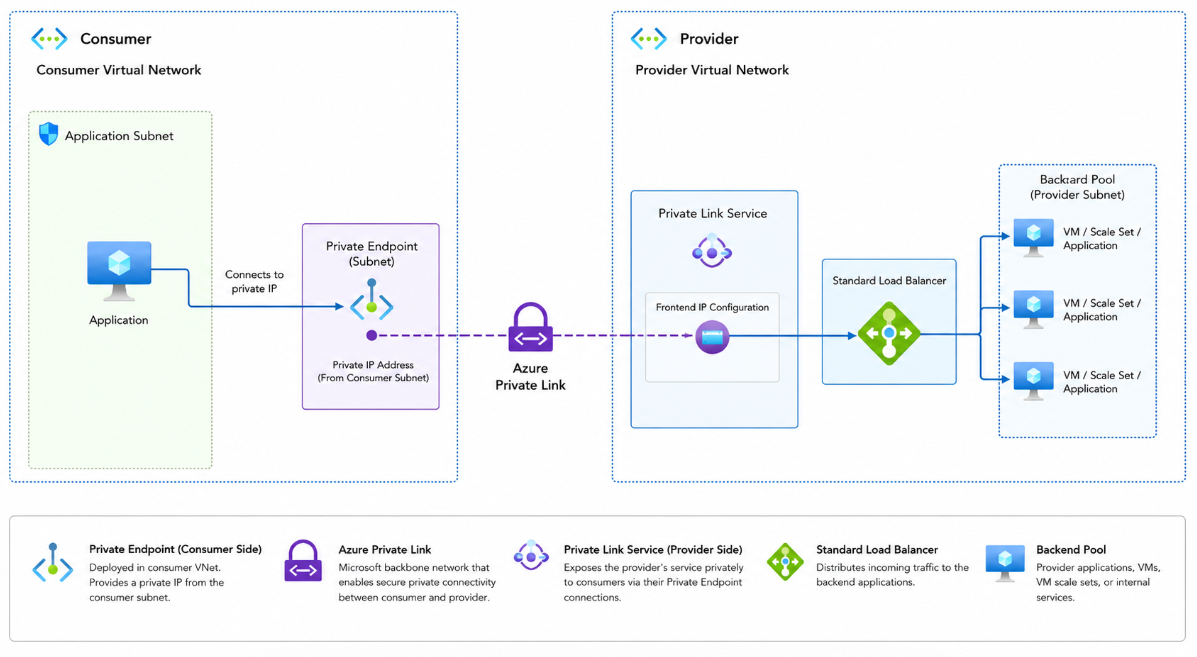
The consumer creates a Private Endpoint in their own virtual network.
That Private Endpoint gets a private IP from the consumer’s subnet. To the consumer’s application, that private IP represents the provider’s service inside the consumer network.
The provider creates a Private Link Service in front of the service they want to expose.
Once the provider approves the connection, traffic from the consumer’s Private Endpoint can flow privately to the provider’s service.
From the consumer’s point of view, the service feels like it is inside their own network because they connect to it using a private IP address.
From the provider’s point of view, they have exposed only that service, not their entire network.
Where the Load Balancer fits
The common and mature Private Link Service pattern uses a Standard Load Balancer.
The Private Link Service connects to the frontend IP configuration of the load balancer. The load balancer then sends traffic to the backend service, such as virtual machines, VM scale sets, AKS ingress, or an internal application tier.
There is also a newer option called Private Link Service Direct Connect, currently in public preview. This allows traffic to go directly to a private destination IP address without the traditional load balancer pattern.
For most designs, I would still explain the Standard Load Balancer pattern first, because it is the most established and easiest to understand.
DNS is not optional
This is one of the most important parts of Private Link.
Private Endpoint gives you the private IP.
DNS makes sure your application actually uses it.
Your application may still call a normal name like:
But behind the scenes, DNS needs to resolve that name to the private endpoint IP.
If DNS is wrong, the Azure setup can look perfect, but the application may still fail or go through the wrong path.
A simple way to see it is:
Private Endpoint gives you the private IP. DNS makes the private path work.
In real projects, many Private Link issues are actually DNS issues.
Where this fits in the AI era
Private Link is also very relevant now because of AI.
Many AI applications connect to sensitive data: documents, contracts, customer records, HR data, financial information, or internal knowledge bases.
For Microsoft-owned services like Azure OpenAI, Azure AI Search, Storage, SQL, or Key Vault, you usually use Private Endpoints to access them privately.
For your own AI application, chatbot, agent, or API, you can use Private Link Service to expose it privately to another network.
A simple pattern looks like this:
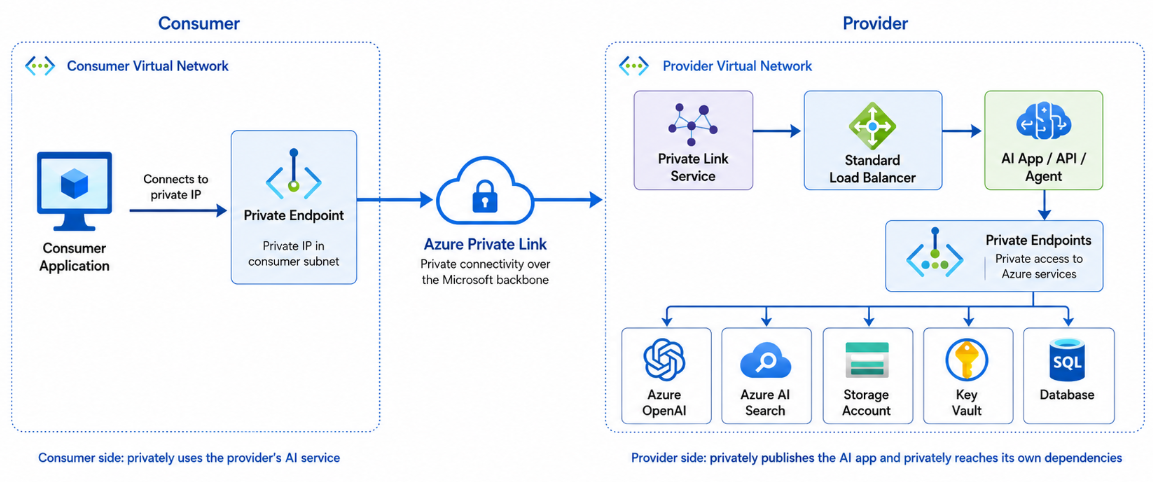
So the consumer privately connects to your AI app, and your AI app privately connects to its Azure dependencies.
That is a strong pattern for enterprise AI, especially where sensitive data is involved.
Private Link is not the whole security story
Private Link protects the network path.
It does not replace authentication, authorisation, RBAC, managed identity, logging, monitoring, or application security.
For AI applications, it also does not replace responsible AI controls, content safety, or data governance.
Private Link answers one important question:
How does traffic privately reach the service?
It does not answer every security question, and that distinction matters.
Final thoughts
Azure Private Link Service is useful when you want to publish your own service privately without exposing it to the public internet.
The main idea is simple:
Expose the service, not the network.
That is why it works well for SaaS platforms, internal APIs, partner integrations, shared services, multi-tenant applications, and private AI workloads.
In a cloud world where more systems, customers, partners, and AI applications need to connect securely, private service-level connectivity is becoming more important.
And that is exactly where Azure Private Link Service fits.
To learn more, check out the Microsoft documentation: What is Azure Private Link service?