June 18, 2026 · 10 min read
Azure Storage Smart Tier: Let Azure Optimise Your Blob Storage Costs Automatically
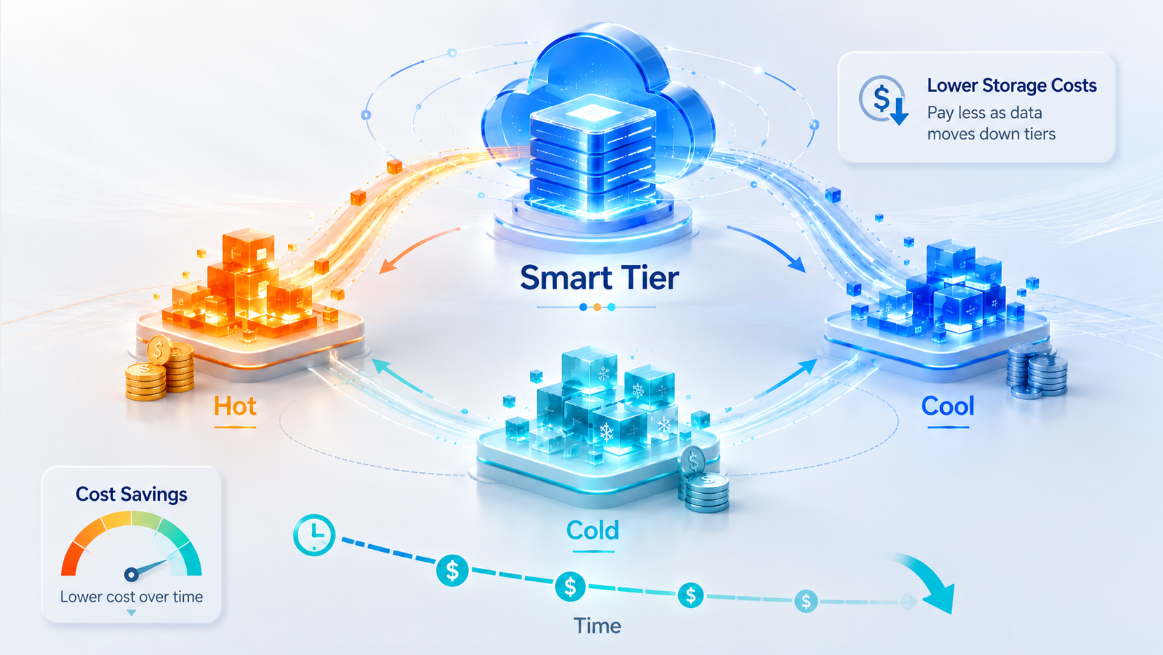
Cloud storage is easy to consume, but not always easy to optimise.
That is why Azure Storage Smart Tier is worth paying attention to. It was first introduced in public preview around Microsoft Ignite in November 2025, giving customers an early way to automate object storage tiering. Since becoming generally available in April 2026, it is now a production-ready option for organisations that want Azure to optimise Blob and Data Lake Storage costs automatically based on real access patterns.
In many Azure environments, data grows quietly in the background. Logs, telemetry, backups, reports, application files, analytics exports, media files, and data lake objects all build up over time. Some of that data is accessed every day. Some is accessed once a month. Some may not be touched again for a very long time.
The challenge is simple: how do you keep storage costs under control when you do not always know how often the data will be accessed?
Traditionally, the answer has been lifecycle management rules. You define policies to move blobs from Hot to Cool, from Cool to Cold, or eventually to Archive based on age or last access time.
That works well when access patterns are predictable.
But in many real environments, they are not.
That is where Azure Storage Smart Tier becomes very useful.
What is Azure Storage Smart Tier?
Azure Storage Smart Tier is an automated tiering capability for Azure Blob Storage and Azure Data Lake Storage.
Instead of manually deciding when data should move between access tiers, Smart Tier allows Azure to manage that movement for you based on actual object access patterns.
In simple terms: Smart Tier lets Azure decide the most cost-effective online tier for your data based on how that data is actually used.
When Smart Tier is enabled, objects start in the Hot tier. If an object is not accessed for 30 days, Azure moves it to the Cool tier. If it remains inactive for another 60 days, meaning 90 days in total, Azure moves it to the Cold tier.
If that object is accessed again, Azure automatically promotes it back to Hot, and the tiering cycle starts again.
So the flow looks like this:
Hot → Cool after 30 days of no access → Cold after 90 days of no access → back to Hot when accessed again
The important point is that the data stays online. Smart Tier does not move data to the Archive tier. This means the data remains immediately accessible, while Azure still helps reduce storage costs by moving inactive data to lower-cost online tiers.
The problem Smart Tier is solving
Before Smart Tier, storage cost optimisation often required engineers to make decisions like:
- Should this data stay in Hot?
- Should it move to Cool after 30 days?
- Should it move to Cold after 90 days?
- What happens if someone suddenly needs to read old data again?
- Should we use Archive, or does this data need to remain instantly available?
These decisions are not always straightforward.
For example, think about telemetry or log data. Some logs may only be useful for recent troubleshooting. Others may suddenly become important during an incident review, audit, or investigation. If you move the data too aggressively into cooler tiers, you may reduce capacity cost but create other cost or access concerns. If you keep everything in Hot, you may avoid surprises but pay more than necessary.
Lifecycle management is still powerful, but it requires you to understand your data patterns well. It also needs ongoing maintenance. As workloads grow, teams can end up with many rules across multiple containers, storage accounts, and environments.
Smart Tier reduces that overhead.
Instead of asking teams to constantly predict access behaviour, Azure continuously evaluates the objects and moves eligible data automatically.
Why this matters in real Azure environments
As an Azure Cloud Engineer, I have seen many environments where storage cost optimisation only becomes a priority after the bill has already grown.
Storage is one of those services that expands quietly. A few containers become hundreds of containers. Application logs become years of retained logs. Data exports become long-term reporting datasets. Before long, the storage account that once looked small becomes a meaningful part of the monthly Azure bill.
Smart Tier gives teams a more practical way to optimise storage without constantly revisiting lifecycle policies.
It is especially useful where:
- Access patterns are unclear.
- Data grows quickly.
- Data must remain online.
- Engineering teams do not want to maintain complex lifecycle rules.
- There is a risk of old data being accessed unexpectedly.
- Cost optimisation matters, but operational simplicity also matters.
This is not just about saving money. It is also about reducing the amount of manual decision-making required to keep storage costs aligned with real usage.
The important requirement: Smart Tier needs zone-redundant storage
One very important point to understand is that Smart Tier is not available for every storage account configuration.
To use Smart Tier, the storage account must use a supported zone-redundant option, such as:
- ZRS
- GZRS
- RA-GZRS
This is easy to miss if you are testing it quickly in the Azure portal. If you create a normal locally redundant storage account, you should not expect Smart Tier to be available in the same way.
Smart Tier also requires a Standard general-purpose v2 storage account. It does not support legacy GPv1 accounts, premium storage accounts, page blobs, or append blobs. It works with block blobs.
So before recommending Smart Tier for an environment, check:
- Is the storage account GPv2?
- Is the redundancy ZRS, GZRS, or RA-GZRS?
- Are the objects block blobs?
- Is the region supported?
- Are there blobs with explicitly assigned tiers?
That last point matters because Smart Tier works through the default account access tier. Blobs that inherit the default tier can be managed by Smart Tier, but blobs with an explicitly set access tier do not automatically move into Smart Tier.
How Smart Tier makes tiering decisions
Smart Tier evaluates the last access time of each managed object.
Read and write operations such as Get Blob and Put Blob update the last access time and restart the tiering cycle.
However, metadata operations such as Get Blob Properties, Get Blob Metadata, and Get Blob Tags do not update the last access time. This matters because not every operation counts as a real access event for Smart Tier movement.
The tiering logic is simple:
- New or newly managed objects start in Hot.
- If there is no qualifying access for 30 days, the object moves to Cool.
- If there is no qualifying access for another 60 days, it moves to Cold.
- If the object is accessed again, it moves back to Hot immediately.
Objects smaller than 128 KiB stay in Hot and do not incur the Smart Tier monitoring fee. Once an object grows to at least 128 KiB, normal Smart Tier behaviour applies.
Billing: what changes and what does not
Smart Tier does not introduce a separate capacity price for data.
Objects are still billed based on the underlying tier they currently sit in: Hot, Cool, or Cold.
There is, however, a monitoring charge for eligible objects managed by Smart Tier. This applies to objects over 128 KiB.
The attractive part is that Smart Tier removes several cost concerns that usually come with manual tiering. Objects managed by Smart Tier are not charged for automatic transitions within Smart Tier, early deletion, or data retrieval.
In simple terms:
- You still pay for storage capacity in the underlying tier.
- You pay a monitoring fee for eligible managed objects.
- You do not pay tier transition, early deletion, or retrieval charges for Smart Tier-managed movement.
This is one of the biggest reasons Smart Tier is useful. It does not just automate tiering; it also reduces some of the billing uncertainty that can come with manually moving data into cooler tiers.
When Smart Tier makes sense
Smart Tier is a strong fit for workloads such as:
- Data lakes
- Analytics workloads
- Telemetry data
- Log storage
- Application-generated files
- Reporting datasets
- Machine learning and AI data stores
- Large estates where access patterns vary over time
It is particularly useful when data needs to remain online but does not need to remain permanently in Hot.
For example, an analytics platform may have recent data that is queried often, older data that is queried occasionally, and historical data that is rarely touched but still needs to be available quickly. Smart Tier can automatically keep active objects in Hot and move inactive objects to Cool or Cold.
That is much easier than constantly tuning lifecycle policies as the workload changes.
When Smart Tier may not be the best option
Smart Tier is useful, but it should not be applied blindly.
It may not be the best fit if your access pattern is already very predictable and your existing lifecycle policies are working well.
It may also not be suitable where you specifically need the Archive tier for very long-term, rarely accessed data where retrieval delay is acceptable and maximum storage cost reduction is the goal.
Remember: Smart Tier uses Hot, Cool, and Cold. It does not use Archive.
You should also be careful with objects that you deliberately want to keep in a specific tier. If an object should not be managed by Smart Tier, explicitly pin it to the appropriate tier.
Also, avoid trying to use lifecycle rules to influence tiering behaviour for Smart Tier-managed objects. Use Smart Tier when you want Azure to manage online tiering automatically.
How to enable Smart Tier
You can enable Smart Tier when creating a new storage account or by updating an existing supported account.
For a new storage account, configure the account as a Standard GPv2 account with supported zone redundancy, then set the default blob access tier to Smart.
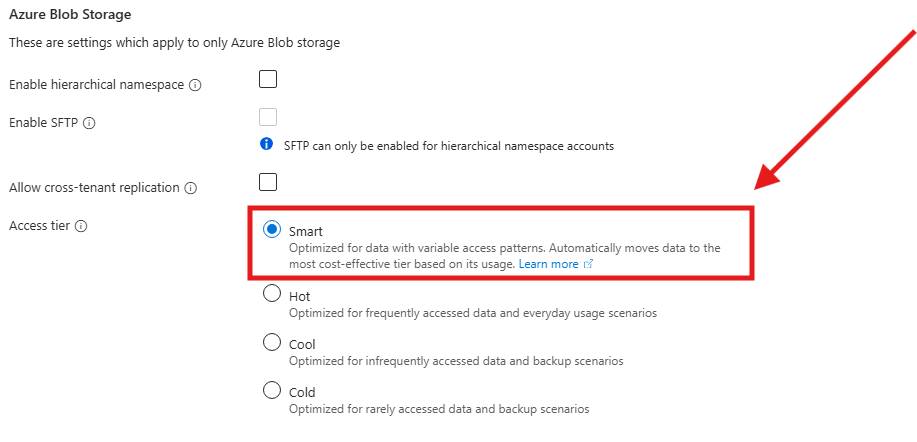
For an existing supported account, go to the storage account configuration and change the default blob access tier to Smart.
After Smart Tier is enabled, blobs that inherit the account default tier can be managed by Smart Tier. Blobs with an explicitly set access tier will not automatically move into Smart Tier.
This distinction is important.
Smart Tier is simple to enable, but it is still worth reviewing the account configuration, redundancy, workload type, existing lifecycle policies, and object count before enabling it in production.
How to monitor Smart Tier
Azure provides built-in metrics to help you understand how objects are distributed across Smart Tier capacity tiers.
In the Azure portal, you can go to the storage account metrics and review metrics such as Blob Count or Blob Capacity. You can then split the data by Blob tier and Blob type.
Useful Smart Tier values include:
- SmartHot
- SmartCool
- SmartCold
- SmartHot-small
These values help you see how much data is currently being managed in each capacity tier.
This is also useful because Smart Tier does not instantly move everything to Cool or Cold. It starts tracking after enablement, and the first down-tiering event happens after 30 days of inactivity.
So if you enable Smart Tier today, do not expect all the savings to appear immediately. It needs time to observe access behaviour and move data accordingly.
Smart Tier vs lifecycle management
Smart Tier does not replace lifecycle management in every scenario.
Lifecycle management is still useful when you have specific rules. For example, you may want to delete objects after a certain number of days, move certain data to Archive, or apply a strict retention model based on business policy.
Smart Tier is better when you want Azure to automatically optimise online tier placement without constantly tuning rules.
A simple way to think about it is this:
Use lifecycle management when you already know the rule.
Use Smart Tier when you do not want to keep guessing the rule.
That is the real value.
Final thoughts
Azure Storage Smart Tier is one of those features that looks simple on the surface but can make a big difference at scale.
It addresses a very real problem: many organisations are storing more object data than ever, but they do not always know how that data will be accessed over time.
Instead of forcing teams to constantly predict access behaviour and maintain lifecycle policies, Smart Tier allows Azure to make online tiering decisions based on actual usage.
For organisations running large data lakes, analytics platforms, telemetry stores, or application storage estates, this can reduce both storage cost and operational overhead.
The key thing is to understand the requirements. Smart Tier needs a supported Standard GPv2 account, it works with block blobs, and it requires zone-redundant storage such as ZRS, GZRS, or RA-GZRS.
If those requirements fit your environment, Smart Tier is definitely worth considering.
For me, the biggest benefit is not just the potential cost saving. It is the simplicity.
Less manual tiering.
Fewer lifecycle rules to maintain.
Better alignment between storage cost and real usage.
And in cloud engineering, that is exactly the kind of optimisation that scales.